
SnapInsta Instagram Downloader: How It Works And Limits
12/14/2025
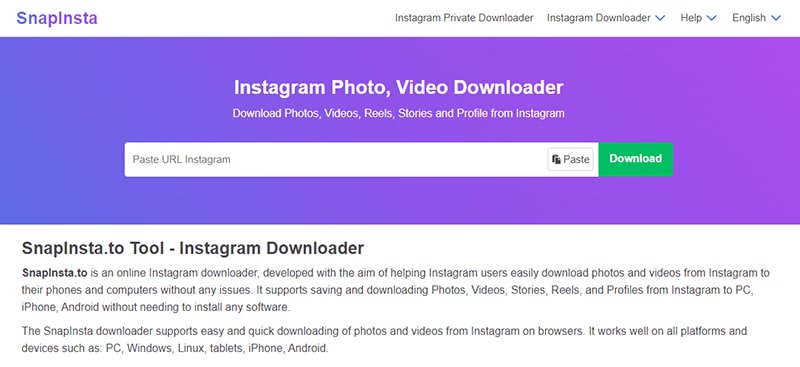
Ever seen an Instagram photo or Reel you wanted to save—only to realize there’s no download button? You’re not imagining it. Instagram makes sharing easy, but saving content isn’t part of the deal. So what do you do when a post matters to you?
That’s where SnapInsta shows up.
SnapInsta positions itself as a simple way to download Instagram photos, videos, Reels, and Stories. No login. No app install. Just a link and a click. Sounds convenient, right?
But convenience raises questions. How does it work behind the scenes? Is it safe to use? And what can you actually download without crossing lines?
This topic isn’t shady by default. Sometimes you just want to save a recipe, a workout clip, or a memory before it disappears.
In this post, I’ll explain what SnapInsta does, how it works, and where the limits are. By the end, you’ll know if it’s the right tool for you—no guessing, no hype.
What Is the SnapInsta App?
SnapInsta is a simple online tool that lets you save Instagram content to your device. Photos, videos, Reels, Stories—if it’s public on Instagram, SnapInsta aims to help you download it.
Why do people look for something like this? Because Instagram doesn’t offer a download button. You can bookmark posts, sure. But once a post disappears or your feed refreshes, it’s gone. SnapInsta steps in to solve that gap.
It positions itself in a very straightforward way:
Who uses it? Regular users who want to save a favorite post. Creators who keep inspiration offline. People who prefer a clean download instead of screenshots or screen recordings.
If you’ve ever thought, “I just want to save this once and move on,” SnapInsta is built for that exact moment.
How Does SnapInsta Work?
So how does SnapInsta actually save Instagram content?
It works with public posts only . Instagram already serves photos, videos, Reels, and Stories on the web. SnapInsta uses the post URL to fetch that public media and turn it into a downloadable file.
Here’s the simple flow:
That’s it. No account connection. No permissions.
SnapInsta does not ask for your Instagram login. You don’t authorize anything through Instagram. Because there’s no login, there’s no link between your account and the download.
Why does this work at all? Technically, SnapInsta’s servers request the same public media your browser can already see, then package it in a format your device can save. Instagram doesn’t include a download button, but the files exist.
Another key point: SnapInsta is browser-based , not a mobile app. You don’t install software or accept device permissions. You can use it on a phone, tablet, or desktop.
Just keep expectations grounded. If a post is private, expired, or restricted, SnapInsta can’t fetch it. When the content is public and the link works, the process stays fast and simple.
What Can You Download With SnapInsta?
So, what can you actually save with SnapInsta ? If the content is public, the tool gives you a clean way to keep it.
Here’s what SnapInsta supports:
As for formats and quality, SnapInsta keeps things simple:
The flow stays easy:
One important reminder: SnapInsta works only with public content . If you can’t see it without logging in, you can’t download it either.
If your goal is to keep public Instagram content handy, this tool covers the basics without fuss.
What SnapInsta Cannot Do
It’s just as important to know what SnapInsta can’t do as it is to know what it can. Clear limits help you avoid the wrong expectations.
Here’s where SnapInsta stops:
So why do these limits exist?
Because SnapInsta works only with public, accessible content . It doesn’t bypass privacy settings. It doesn’t break into accounts. It simply turns publicly shared media into downloadable files.
If you ever see a tool that claims it can download private posts, messages, or live streams, pause for a moment. Those promises usually signal risk, not convenience.
SnapInsta keeps things within clear boundaries. If you understand those boundaries, you’ll know exactly when the tool helps—and when it won’t.
Is the SnapInsta App Safe to Use?
So, is SnapInsta safe? The honest answer depends on how you use it—and what you expect from a downloader like this.
Let’s start with the good part. SnapInsta does not ask for your Instagram login. You don’t enter a password. You don’t connect an account. That alone removes one of the biggest risks people worry about.
It also works in your browser. You don’t install an app or give permissions on your device. For many users, that already feels safer than downloading random software.
Still, it’s smart to stay alert. Like many free tools, SnapInsta may show ads, pop-ups, or redirects. Most are harmless, but a careless click can take you somewhere you didn’t plan to go. If something looks off, close the page and move on.
So what does “safe” really mean here?
It means:
It does not mean zero risk or total privacy online.
If you understand those limits and use common sense, SnapInsta can be safe enough for casual use. The key is awareness, not blind trust.
SnapInsta vs Other Instagram Downloaders
If you’ve tried a few Instagram downloaders, you’ve probably noticed they all promise the same thing. So what makes SnapInsta different?
The biggest difference is how simple it feels. You open the site, paste a link, and download. No account. No setup. No extra steps. That alone puts it ahead of many tools that push app installs or ask you to sign in first.
Speed matters too. SnapInsta usually processes links fast and doesn’t bury the download button under menus or pop-ups. When you just want the file, that makes a difference.
There’s also the browser-based angle. SnapInsta runs in your browser, not as an app. That means no permissions, no storage access requests, and fewer privacy questions. App-based tools may offer more features, but they also bring more risk.
So when does SnapInsta make the most sense? When you want a quick, low-effort way to save public Instagram content and move on.
If you need advanced tools or bulk features, you might look elsewhere. But for everyday downloads, SnapInsta keeps things easy—and sometimes that’s exactly what you want.
Conclusion
So, what’s the simple takeaway about SnapInsta ?
SnapInsta works by turning public Instagram links into downloadable files. You copy a post URL, paste it into the tool, and save the content you want. No login. No account connection. Just a browser and a link.
Who is it best for? People who want to keep photos, videos, Reels, or Stories for personal use. Creators who save inspiration. Anyone who prefers a quick, no-friction solution instead of screenshots or screen recordings.
It also helps to stay realistic. SnapInsta won’t access private accounts, messages, or live streams. It works only with public content, and that limit exists for a reason.
The key is informed use. If you understand what SnapInsta does and respect its boundaries, it can be a simple and useful tool. Sometimes, that’s all you need.